

Authentication
FlexFS uses a multi-layer token model to authenticate and authorize access to different parts of the system. There are three types of tokens, each serving a distinct purpose.
Token types
Section titled “Token types”Account tokens
Section titled “Account tokens”Purpose: Authenticate administrative API access to the admin server.
Account tokens are associated with accounts and are used by:
configure.flexfsto manage resources (volumes, block stores, meta stores, etc.)- The CSI driver controller for dynamic volume provisioning
- Any client that needs to call the admin REST API
The account and its token are created when the admin server first creates its database. View or rotate the token with configure.flexfs.
Volume tokens
Section titled “Volume tokens”Purpose: Authenticate mount clients to a specific volume.
Volume tokens are the primary authentication mechanism for mount.flexfs. Each volume token:
- Grants access to one specific volume
- Can optionally restrict the mount to a subdirectory via mount path scoping
- Can carry per-token mount flags (e.g.,
ro,noExec) - Can be granted the
adminflag, which additionally allows reporting queries against the volume’s metadata (see Metadata REST API) - Is passed to the mount client via the credentials file
When a mount client starts, it presents the volume token to the admin server, which returns the volume settings. It then presents the same token to the metadata server, which validates it with the admin server (see Authentication flow).
Metadata tokens
Section titled “Metadata tokens”Purpose: Authenticate metadata server connections to the admin server.
When a metadata server starts, it uses a token to authenticate with the admin server. This token is configured during meta.flexfs init creds and is stored in the metadata server’s credentials file.
Credential files
Section titled “Credential files”Each component stores its credentials in a TOML file created during init creds:
Mount client credentials
Section titled “Mount client credentials”adminAddr = "admin.example.com:443"token = "<volume-token>"For encrypted volumes, the secret is also stored:
adminAddr = "admin.example.com:443"token = "<volume-token>"secret = "<secret>"The default location is ~/.flexfs/mount/creds/<volume-name>. Override it with --credsFile, on both init creds and start:
mount.flexfs start <volume-name> /mnt/data --credsFile /path/to/credsMetadata server credentials
Section titled “Metadata server credentials”The metadata server credentials file always holds the admin server address and auth token. Block store credentials are written only when supplied at init creds time:
adminAddr = "admin.example.com:443"token = "<meta-token>"
# Optional -- present only when block store credentials were suppliedblockUser = "<block-user>"blockPass = "<block-pass>"
Reporting utility credentials
Section titled “Reporting utility credentials”find.flexfs, analyze.flexfs and dedup.flexfs share one file per volume, per user:
~/.flexfs/util/creds/<volume-name>One init creds therefore serves all three.
Each holds the admin server address and a volume token carrying the admin flag — the same two keys mount.flexfs writes, so either file can be read by either side:
adminAddr = "admin.example.com:443"token = "<volume-token>"Nothing about what the token is is stored. On every run the utility asks the admin server which volume the token belongs to and which subtree of it the token is scoped to, and uses both to check the token against the mount it is being run inside and to express paths the way that token sees them.
A user with no credentials of their own uses the mount client’s for the same volume and user.
configure.flexfs credentials
Section titled “configure.flexfs credentials”The configure.flexfs tool stores its credentials (admin server address and account token) in a separate credentials file, created during its init process.
Authentication flow
Section titled “Authentication flow”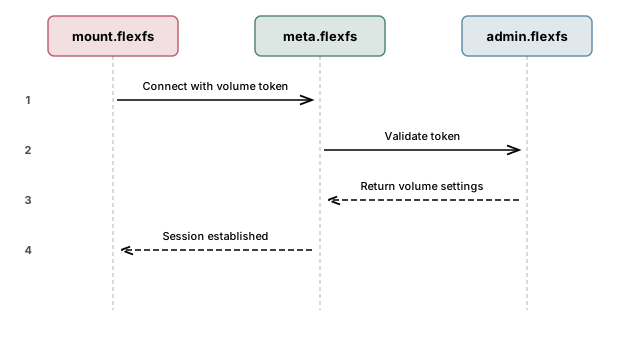
- The mount client reads the admin server address and volume token from its credentials file.
- It presents the token to the admin server, which returns the volume settings, including the metadata server address.
- It connects to the metadata server and sends the token with its requests.
- The metadata server validates the token with the admin server. If valid, a session is established and the mount client can begin filesystem operations.
- The metadata server revalidates the token about once a minute, so a revoked token stops working within about two minutes.
Token lifecycle
Section titled “Token lifecycle”| Action | Tool | Description |
|---|---|---|
| Create account token | admin.flexfs | The account and its token are created when the admin server first creates its database; change the token with configure.flexfs update account |
| Create volume token | configure.flexfs | Created with create volume-token. The CSI driver also creates one for each volume it provisions. |
| View tokens | configure.flexfs | List the account’s tokens, optionally filtered by volume |
| Revoke a token | configure.flexfs | Delete the token; mounts using it are refused and unmount themselves within about two minutes. A mount in use at the time is left disconnected instead (details) |
Security best practices
Section titled “Security best practices”- Credentials files must be
0600— readable by their owner and nobody else. Everyinit credscommand writes them this way, and every flexFS program refuses to read one that others can read, naming the file and thechmodthat fixes it. - Use separate volume tokens for different teams or applications so that access can be revoked independently.
- Issue a dedicated token for reporting. A token carrying the
adminflag can list every file and directory name in its volume, along with owners and permissions. Keeping it separate from the tokens your mounts use means the grant can be withdrawn without disturbing them. - Use mount path scoping on volume tokens to restrict access to specific subdirectories. See Access Control for details.
- Rotate tokens periodically by creating new tokens and updating credentials files, then deleting old tokens.
- Restrict where API calls may come from with an access file, so a leaked token is only usable from the networks you named. See API Access Control.
Where a caller may call from
Section titled “Where a caller may call from”Tokens answer who a caller is. They say nothing about where the call came from, so a leaked account token works from anywhere that can reach the admin server. An access file adds that second layer: a per-server list of IP addresses and CIDR blocks allowed to reach each endpoint, re-read every couple of seconds so it can be tightened without a restart. A request from an address no rule admits is refused 403 before the handler looks at its Authorization header.
The layers are independent — a whitelisted address still needs a valid token, and a valid token still has to come from a whitelisted address. Servers with no access file, which is the default, are unrestricted.
Worth knowing before writing one: most callers of the admin and free-tier APIs are machines rather than people.
| Caller | Endpoints it needs |
|---|---|
Mount clients (mount.flexfs) | GET /v1/volumes/for-token/settings, PATCH /v1/volumes/for-token/secret-id, and the /deploy/ install URLs |
Reporting utilities (find.flexfs, analyze.flexfs, dedup.flexfs) | GET /v1/volumes/for-token/settings |
The metadata server (meta.flexfs) | GET /v1/volumes/for-token/settings, GET /v1/volumes/{volumeID}/settings, POST /v1/volumes/stats, GET /v1/rate-bins, GET /v1/volumes/retired, DELETE /v1/volumes/{volumeID} |
| The CSI driver | POST /v1/volumes, GET /v1/volumes/for-name/{volumeName}/tokens, PATCH /v1/volumes/for-name/{volumeName}/quota, DELETE /v1/volumes/for-name/{volumeName} |
Operators (configure.flexfs) | /v1/configure/* |
A rule aimed at the last row will gate the others unless they are opened back up. See API Access Control, which describes what each server logs on every load so this is caught while editing rather than during an incident.
Next steps
Section titled “Next steps”- TLS Certificates — secure the transport layer
- API Access Control — restrict which source addresses may reach each endpoint
- Access Control — POSIX permissions, root squashing, ACLs
- End-to-end Encryption — encrypt data at rest