

Architecture Overview
FlexFS is a distributed network filesystem that provides POSIX-compatible access to cloud object storage. Its architecture separates metadata (file names, permissions, directory structure) from block data (file contents), routing each through purpose-built paths optimized for their access patterns.
High-level component diagram
Section titled “High-level component diagram”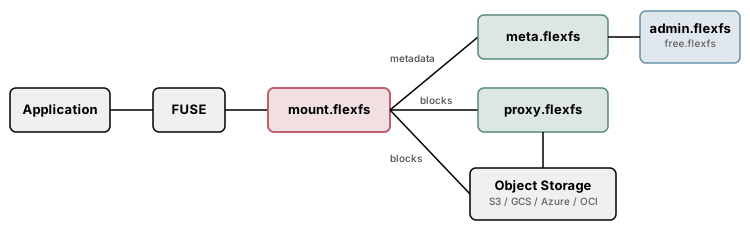
Design principles
Section titled “Design principles”Metadata and data are separated. Metadata operations (lookup, create, rename, chmod, lock) flow through the metadata server over a binary RPC protocol. Block data (read, write) flows directly between mount clients and object storage over HTTPS REST — or optionally through proxy servers. This separation means that the metadata server is never a throughput bottleneck for large file I/O.
Blocks are the unit of storage. Every file is divided into fixed-size blocks (2 MiB in Community; in Enterprise, a power of two from 256 KiB to 8 MiB set per volume, defaulting to 4 MiB). Blocks are individually compressed, optionally encrypted, and stored as objects in a cloud bucket. Each block is identified by its inode number, block index, and a key unique to each version of the block.
Caching is multi-tiered. Mount clients maintain an in-memory LRU cache (L1), an optional on-disk cache with writeback support (L2), and can route reads and writes through Enterprise proxy groups that act as a shared caching layer (L3).
Encryption keys never leave the client. When end-to-end encryption is enabled (Enterprise), the mount client encrypts and decrypts block data, file names, symlink targets, and extended attribute names and values locally, so the metadata server, proxy servers, and object storage never see them in plaintext. Other metadata, such as file sizes, modes, owners, and timestamps, is not encrypted. See Encryption Design.
The 15 binaries
Section titled “The 15 binaries”FlexFS ships as 15 standalone binaries. They fall into three categories:
| Category | Binaries | Role |
|---|---|---|
| Servers | admin.flexfs, aws.flexfs, error.flexfs, free.flexfs, meta.flexfs, proxy.flexfs, stat.flexfs | Long-running services, run directly or as systemd services |
| Clients / Drivers | mount.flexfs, csi.flexfs | Mount the filesystem (FUSE mount client, Kubernetes CSI driver) |
| Utilities | configure.flexfs, manage.flexfs, analyze.flexfs, dedup.flexfs, find.flexfs, license.flexfs | Administration, analysis, and maintenance tools |
aws.flexfs, error.flexfs, license.flexfs, and stat.flexfs are internal components operated by Paradigm4. They are not deployed by customers.
FlexFS binaries are statically linked. Servers can be run directly by any user; the installers set them up as systemd services, which run as root and are optional. mount.flexfs needs the FUSE kernel module, plus the fusermount3 (or fusermount) helper from the FUSE userspace package for mounts by non-root users and on hosts where /etc/mtab is a regular file.
See Component Roles for detailed descriptions of each binary.
Protocol summary
Section titled “Protocol summary”| Path | Protocol | Transport | Purpose |
|---|---|---|---|
| mount.flexfs to meta.flexfs | Binary RPC over WebSocket | wss (TCP + TLS) | All metadata operations (lookup, create, setattr, lock, readdir, etc.) |
| mount.flexfs to object storage | HTTPS REST | TCP + TLS | Block read/write/delete (S3, GCS, Azure, OCI native APIs) |
| mount.flexfs to proxy.flexfs | HTTPS REST | TCP + TLS | Block read/write through proxy cache |
| Utilities to meta.flexfs | HTTPS REST | TCP + TLS | Analysis queries, deduplication, search |
| admin.flexfs REST API | HTTPS REST | TCP + TLS | Configuration management, deploy endpoints, volume settings |
| meta.flexfs to admin.flexfs or free.flexfs | HTTPS REST | TCP + TLS | Volume settings, volume token validation, billing rates, retired volumes, and per-volume usage statistics |
| admin.flexfs to stat.flexfs | HTTPS REST | TCP + TLS | Usage metering (Enterprise) |
Two editions
Section titled “Two editions”FlexFS is available in two editions sharing the same core architecture:
-
Community Edition uses
free.flexfsas its administration server. It supports a single volume with no end-to-end encryption, no proxy groups, and no dynamic Kubernetes provisioning. All other features — including local on-disk writeback caching, POSIX compliance, configurable retention (default 7 days) with point-in-time mounts, and all four storage backends — are fully available. -
Enterprise Edition uses
admin.flexfsandconfigure.flexfsfor multi-volume management. It adds end-to-end encryption, proxy groups, configurable volume quotas, per-volume block size and retention, volume retirement, dynamic CSI provisioning, and usage reporting to the Paradigm4 statistics server for billing and metering.
Both editions use the same mount.flexfs, meta.flexfs, and utility binaries.