

Docker Compose
This guide shows how to use Docker Compose to run a flexFS mount as a sidecar container alongside your application containers. The sidecar pattern keeps the FUSE mount in a dedicated container that shares its filesystem with the application containers via a shared volume.
Architecture
Section titled “Architecture”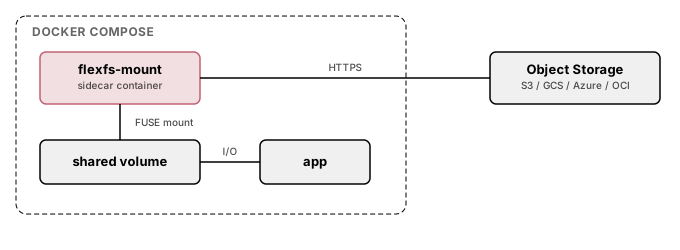
docker-compose.yml
Section titled “docker-compose.yml”services: flexfs-mount: image: flexfs-mount:latest cap_add: - SYS_ADMIN devices: - /dev/fuse security_opt: - apparmor=unconfined volumes: - /tmp/flexfs-shared:/mnt/data:rshared - ./creds:/etc/flexfs/creds:ro command: > start <volume-name> /mnt/data --foreground --credsFile /etc/flexfs/creds restart: unless-stopped healthcheck: test: ["CMD", "mountpoint", "-q", "/mnt/data"] interval: 10s timeout: 5s retries: 3
application: image: your-application:latest volumes: - /tmp/flexfs-shared:/data:rshared depends_on: flexfs-mount: condition: service_healthyStep-by-step setup
Section titled “Step-by-step setup”1. Build the mount image
Section titled “1. Build the mount image”There is no published mount.flexfs container image, so the flexfs-mount:latest image the compose file names is one you build. Create a build directory holding the mount binary and the Dockerfile shown below, then build it:
mkdir -p flexfs-imagecp /sbin/mount.flexfs flexfs-image/# save the Dockerfile from "Using a dedicated flexFS image" as flexfs-image/Dockerfiledocker build -t flexfs-mount:latest ./flexfs-imageAlternatively, replace the service’s image: with build: ./flexfs-image and let Compose build it — see Using a dedicated flexFS image.
2. Create the credentials file
Section titled “2. Create the credentials file”cat > creds <<EOFadminAddr = "<admin-addr>"token = "<volume-token>"EOFchmod 600 credschmod 600 is required, not advisory: flexFS refuses to read a credentials file that grants any permission to its group or to other users. Ownership is not checked, so a file created by a non-root user works when bind-mounted into a container that runs as root.
3. Create the shared directory
Section titled “3. Create the shared directory”Create it and mark it shared, so the FUSE mount made inside the sidecar propagates to the application container:
mkdir -p /tmp/flexfs-sharedsudo mount --bind /tmp/flexfs-shared /tmp/flexfs-sharedsudo mount --make-rshared /tmp/flexfs-shared4. Start the services
Section titled “4. Start the services”docker compose up -d5. Verify
Section titled “5. Verify”# Check mount sidecar healthdocker compose ps
# Verify mount inside the application containerdocker compose exec application ls /dataUsing a dedicated flexFS image
Section titled “Using a dedicated flexFS image”The image built in step 1 comes from this Dockerfile:
FROM ubuntu:24.04RUN apt-get update && apt-get install -y fuse3 ca-certificates && rm -rf /var/lib/apt/lists/*COPY mount.flexfs /sbin/mount.flexfsRUN chmod +x /sbin/mount.flexfsENTRYPOINT ["/sbin/mount.flexfs"]Then reference it in docker-compose.yml:
services: flexfs-mount: build: ./flexfs-image cap_add: - SYS_ADMIN devices: - /dev/fuse security_opt: - apparmor=unconfined volumes: - /tmp/flexfs-shared:/mnt/data:rshared - ./creds:/etc/flexfs/creds:ro command: > start <volume-name> /mnt/data --foreground --credsFile /etc/flexfs/credsMultiple volumes
Section titled “Multiple volumes”To mount multiple flexFS volumes, add additional sidecar services:
services:  flexfs-input:    image: flexfs-mount:latest    cap_add:      - SYS_ADMIN    devices:      - /dev/fuse    security_opt:      - apparmor=unconfined    volumes:      - /tmp/flexfs-input:/mnt/data:rshared      - ./creds-input:/etc/flexfs/creds:ro    command: start input-volume /mnt/data --foreground --credsFile /etc/flexfs/creds    healthcheck:      test: ["CMD", "mountpoint", "-q", "/mnt/data"]      interval: 10s      timeout: 5s      retries: 3
  flexfs-output:    image: flexfs-mount:latest    cap_add:      - SYS_ADMIN    devices:      - /dev/fuse    security_opt:      - apparmor=unconfined    volumes:      - /tmp/flexfs-output:/mnt/data:rshared      - ./creds-output:/etc/flexfs/creds:ro    command: start output-volume /mnt/data --foreground --credsFile /etc/flexfs/creds    healthcheck:      test: ["CMD", "mountpoint", "-q", "/mnt/data"]      interval: 10s      timeout: 5s      retries: 3
  application:    image: your-application:latest    volumes:      - /tmp/flexfs-input:/input:rshared      - /tmp/flexfs-output:/output:rshared    depends_on:      flexfs-input:        condition: service_healthy      flexfs-output:        condition: service_healthy
Create each host directory and mark it shared before starting, as in the single-volume setup:
for d in /tmp/flexfs-input /tmp/flexfs-output; do mkdir -p "$d" sudo mount --bind "$d" "$d" sudo mount --make-rshared "$d"doneRead-only mounts
Section titled “Read-only mounts”To mount a volume as read-only, add --ro to the mount command:
command: start <volume-name> /mnt/data --foreground --credsFile /etc/flexfs/creds --roGraceful shutdown
Section titled “Graceful shutdown”docker compose down stops the application containers before the sidecars they depend on. The mount.flexfs process then receives SIGTERM, writes out pending data, unmounts the filesystem, finishes pending uploads, and exits. If a process still has a file open under the mount, the unmount fails and the mount keeps serving. Docker kills the container when its stop grace period (10 seconds by default) ends, and writes not yet uploaded at that point can be lost. Set stop_grace_period on the sidecar service to allow time for uploads to finish:
services: flexfs-mount: stop_grace_period: 2m