Component Roles
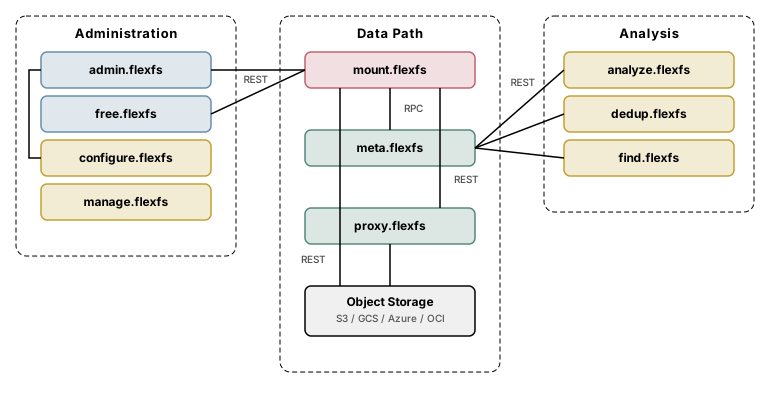
FlexFS is composed of 15 binaries organized into servers, clients/drivers, and utilities. This page describes the purpose and role of each.
Servers
Section titled “Servers”Servers are long-running processes, run directly by any user or as optional root systemd services. They bind to network ports and serve requests from clients and other servers.
admin.flexfs (Enterprise)
Section titled “admin.flexfs (Enterprise)”The Enterprise administration server. It stores and serves the cluster configuration — providers, regions, block stores, metadata stores, volumes, volume tokens, proxy groups, and accounts. All configuration changes go through its REST API, which is accessed interactively via configure.flexfs or programmatically.
admin.flexfs also hosts deploy endpoints that mount clients use for auto-update: it serves the latest mount.flexfs binary so clients can upgrade themselves without manual intervention.
aws.flexfs (Internal)
Section titled “aws.flexfs (Internal)”The AWS Marketplace integration server. It serves the registration page that AWS Marketplace sends subscribers to, issues their license keys through the statistics server, follows subscription changes to suspend or resume license grants, and reports each subscriber’s usage to AWS for billing. See aws.flexfs.
This is an internal component operated by Paradigm4. It is not deployed by customers and is not installed by the Community or Enterprise installers.
error.flexfs (Internal)
Section titled “error.flexfs (Internal)”The error-report collection server. It receives the panic and error reports that flexFS binaries send when run with --reportErrors, stores each report under its report folder, and optionally forwards a summary of each to a Slack channel. It is the receiving end of the --reportErrors mechanism exposed by the other binaries.
This is an internal component operated by Paradigm4. It is not deployed by customers and is not installed by the Community or Enterprise installers.
free.flexfs (Community)
Section titled “free.flexfs (Community)”The Community edition administration server. It provides the same deploy endpoints and volume settings API as admin.flexfs, but manages a single pre-configured volume. There is no interactive configuration tool and no support for end-to-end encryption, proxy groups, or dynamic Kubernetes provisioning.
All CLI utilities (analyze.flexfs, dedup.flexfs, find.flexfs, manage.flexfs) work with the Community edition. Local on-disk writeback caching is also available.
meta.flexfs
Section titled “meta.flexfs”The metadata server. It stores and serves all filesystem metadata: inodes, directory entries, file attributes, extended attributes (xattrs), ACLs, and file locks. Mount clients communicate with it over a binary RPC protocol for all metadata operations.
The metadata server also deletes unneeded blocks from object storage. A block replaced by an overwrite, or belonging to a deleted file, is deleted once the volume’s retention period has elapsed. In addition, a weekly reconciliation scan of object storage (Saturdays at 03:00, server local time) deletes objects under the block store prefix that are named like blocks of the server’s volumes, are more than 48 hours old, and are not current or retained blocks, so a block store’s prefix should not hold other data.
Each metadata server instance is associated with one or more volumes. In Enterprise deployments, multiple metadata server instances can run on different hosts, each serving a different set of volumes.
proxy.flexfs (Enterprise)
Section titled “proxy.flexfs (Enterprise)”The proxy server provides a CDN-like block caching layer between mount clients and object storage. Proxy servers are organized into proxy groups — sets of one or more proxy addresses that serve the same logical caching tier.
When a mount client starts, and whenever its volume’s proxy groups change, it probes every server of each proxy group configured for its volume, and selects the fastest group whose servers all respond. After a proxy request still fails after 15 seconds of retries, it goes direct for 5 minutes and then probes again, preferring another group. Within a group, each block always goes to the same proxy server, and adding or removing a server moves only a small share of blocks to a different server.
Proxy servers maintain a local disk cache. Writes are acknowledged to the mount client as soon as the proxy has written the block to its disk cache (and, only when proxy.flexfs runs with --sync, flushed it to disk with fsync), and the proxy asynchronously flushes blocks to object storage in the background. This makes proxy groups especially effective for hybrid cloud and on-premises deployments where object storage latency would otherwise be a bottleneck.
Mount clients fall back to direct object storage access when no proxy group responds to the probe, for 5 minutes after a proxy request still fails after 15 seconds of retries, and, when the volume sets maxProxied, for each file’s blocks beyond that count.
stat.flexfs (Internal)
Section titled “stat.flexfs (Internal)”The billing and metering server. It collects usage data from Enterprise admin servers — which aggregate per-volume statistics reported up the chain by mount clients through the metadata servers — and generates reports for capacity planning and licensing. See stat.flexfs.
This is an internal component operated by Paradigm4. It is not deployed by customers and is not installed by the Community or Enterprise installers.
Clients and drivers
Section titled “Clients and drivers”mount.flexfs
Section titled “mount.flexfs”The mount client. It uses Linux FUSE (Filesystem in Userspace) to present a POSIX-compatible filesystem to applications. When an application issues a system call (open, read, write, stat, etc.), the kernel routes it through /dev/fuse to mount.flexfs, which translates it into metadata RPCs and block storage operations.
Key responsibilities:
- Metadata RPC: All metadata operations (lookup, create, setattr, readdir, lock, xattr, ACL) are sent to the metadata server over a persistent RPC connection.
- Block I/O: File data is read from and written to object storage (or proxy servers) over HTTPS REST. Blocks are compressed, optionally encrypted, and cached locally.
- Three-tier caching: In-memory LRU cache, optional on-disk cache with writeback support, and optional proxy group routing.
- Auto-update: Polls the administration server’s deploy endpoint for new versions and performs a live FUSE session handoff to the updated binary.
- Time-travel: Supports read-only mounting at a specific point in time (
--atTimein RFC 3339 format).
mount.flexfs runs as a daemon by default, forking into the background and logging to a file. It can also run in foreground mode or under systemd.
csi.flexfs
Section titled “csi.flexfs”The Kubernetes CSI (Container Storage Interface) driver. It wraps mount.flexfs to provide native Kubernetes volume provisioning. It consists of a controller component (Deployment) and a node component (DaemonSet). The Enterprise edition supports dynamic provisioning via StorageClass; both editions support static provisioning via PersistentVolume.
Utilities
Section titled “Utilities”Utilities are short-lived command-line tools that perform administrative or analytical tasks.
configure.flexfs (Enterprise)
Section titled “configure.flexfs (Enterprise)”The interactive configuration tool for Enterprise deployments. It provides a REPL (read-eval-print loop) and single-command mode for managing all ten resource types: providers, regions, block APIs, block stores, metadata stores, volumes, volume tokens, accounts, proxy groups, and volume-proxy-group associations.
Not available in the Community edition.
manage.flexfs
Section titled “manage.flexfs”The host management tool. It provides subcommands for controlling flexFS services on a host: start, stop, restart, status, clean, download, install, deploy, upgrade, and watch. It manages service ordering. Its service and binary subcommands require root; flexFS servers and mount clients do not need it to run.
analyze.flexfs
Section titled “analyze.flexfs”Volume analysis tool. Connects to a metadata server and generates reports on files, folders, and per-user usage. Useful for capacity planning and auditing.
dedup.flexfs
Section titled “dedup.flexfs”File deduplication tool. Scans a mounted volume for duplicate files (by size filtering and content comparison), and optionally hard-links duplicates to reclaim storage.
find.flexfs
Section titled “find.flexfs”Filesystem search tool. Queries the metadata server to locate files and directories matching specified criteria, similar to the Unix find command but operating directly against the metadata store rather than traversing the FUSE mount.
license.flexfs (Internal)
Section titled “license.flexfs (Internal)”The licensing tool for creating and verifying signed flexFS license grants. See license.flexfs.
This is an internal tool operated by Paradigm4. It is not used by customers.
Component relationships
Section titled “Component relationships”