

Storage Backends
FlexFS supports four cloud object storage backends behind a unified block storage layer. Every backend provides the same set of block operations — read a block, write a block, delete one or many blocks, and list blocks — so the rest of the system is agnostic to the underlying storage provider.
Supported backends
Section titled “Supported backends”| API Code | Backend | SDK |
|---|---|---|
s3 | Amazon S3 (and S3-compatible stores) | AWS SDK for Go v2 |
gcs | Google Cloud Storage | Google Cloud Go client |
azure | Azure Blob Storage | Azure SDK for Go |
oci | Oracle Cloud Infrastructure Object Storage | OCI Go SDK |
The API code is specified when creating a block store via configure.flexfs (Enterprise) or during installation (Community).
Common abstraction
Section titled “Common abstraction”All four backends share the same block-level capabilities:
- Read a block: Download a single block by its store key.
- Write a block: Upload a single block. For S3, optionally enables server-side encryption (SSE-S3 with AES-256).
- Delete one or many blocks: Remove a single block or a batch of blocks. S3 supports batch deletion of up to 1,000 objects per call; GCS, Azure, and OCI delete blocks individually in parallel (concurrency limit of 10).
- List blocks: Enumerate all objects under the volume’s prefix. Used by the metadata server for block reconciliation (garbage collection of orphaned blocks).
- Mint a versioned block key: Generate a timestamp-based key in the format
{unixSeconds}_{nanoseconds}. This format enables chronological ordering and point-in-time auditing.
Each backend manages its own HTTP client, credential refresh, retry logic, and a configurable per-backend concurrency limit.
Block key layout
Section titled “Block key layout”Blocks are stored as objects with keys following this structure:
{prefix}/{volumeID}/{inode}/{blockIndex}/{timestampKey}where {prefix} is the block store prefix. For example, with prefix flexfs, volume ID 0b5c3a9e-7f41-4d2a-9e6b-2c8d1f4a7e30, inode 42, block index 3, written at Unix timestamp 1711234567 with nanosecond offset 890123456:
flexfs/0b5c3a9e-7f41-4d2a-9e6b-2c8d1f4a7e30/42/3/1711234567_890123456Partition-based key distribution
Section titled “Partition-based key distribution”When the prefix contains the literal string partition, flexFS replaces it with a 16-bit binary hash derived from the inode number and block index. For example, a block store prefix of flexfs/partition produces keys like flexfs/0110101110010011/0b5c3a9e-7f41-4d2a-9e6b-2c8d1f4a7e30/42/3/1711234567_890123456, distributing objects across 65,536 possible prefix partitions. This is beneficial for storage backends that use key-prefix-based partitioning to scale throughput (notably S3, which partitions by prefix for request rate scaling).
Authentication and credentials
Section titled “Authentication and credentials”Each backend supports multiple credential strategies, resolved in priority order by the component that holds the credentials (the metadata server, or a proxy server). When a block store has no password, the metadata server resolves credentials this way and passes them to mount clients, so mount hosts need no storage credentials of their own. See Credential Handling.
Amazon S3
Section titled “Amazon S3”- Static credentials: Access key ID and secret access key provided in the block store configuration (username/password fields).
- EC2 instance role: Temporary credentials from the EC2 instance metadata service, refreshed before they expire.
- AWS SDK default chain: If the instance metadata service is unreachable, the standard AWS chain is used: environment variables,
~/.awsshared files, web identity (for example, EKS IAM roles for service accounts), and container credentials (ECS task roles, EKS Pod Identity).
Because the instance role is tried first, it takes precedence over web identity and container credentials wherever the instance metadata service is reachable.
S3 also supports custom endpoints for S3-compatible stores (MinIO, Wasabi, Ceph RGW, etc.). When the endpoint does not end in amazonaws.com, path-style addressing is automatically enabled.
Google Cloud Storage
Section titled “Google Cloud Storage”- Service account JSON key: Provided as the password in the block store configuration.
- Application default credentials: Uses the standard Google Cloud credential chain.
Azure Blob Storage
Section titled “Azure Blob Storage”- Shared key credential: Storage account name (username) and access key (password).
- Microsoft Entra ID: With the storage account name (username) and no access key. For mount clients, the metadata server obtains a token from its host’s managed identity only. Proxy servers, and the metadata server’s own storage access, use the Azure default credential chain (environment variables, workload identity, managed identity, and Azure CLI login).
The Azure endpoint is https://{storageAccount}.blob.core.windows.net/, or the block store’s address when one is set.
Oracle Cloud Infrastructure
Section titled “Oracle Cloud Infrastructure”- Static configuration: OCI user OCID, tenancy, region, key ID, key fingerprint, and private key provided in the block store configuration.
- Instance principal: Automatic credential retrieval from the OCI instance metadata service.
- Default config provider: Uses
~/.oci/config.
An OCI block store also records the Object Storage namespace (--namespace), because OCI Object Storage requires a namespace in addition to the bucket name.
Retry and resilience
Section titled “Retry and resilience”All four backends share the same resilience strategy:
- Retry with backoff: Failed operations are retried with a randomized backoff that lengthens with each consecutive failure, capped at 5 seconds per retry, for up to 24 hours. Each page of a listing gives up after 15 minutes. Reading a block that does not exist gives up after 2 minutes, or after 2 hours when the volume has proxy groups, since a proxy server may still be uploading it.
- Credential refresh: On HTTP 401 or 403 errors, the backend resets its client and re-acquires credentials. Client resets are rate-limited to at most once per second to avoid thundering-herd credential refreshes.
- Rate limiting: HTTP 429 (Too Many Requests) and 503 (Service Unavailable) responses trigger a random sleep of 500-3000 ms before retrying.
- Concurrency control: Each backend limits concurrent operations via a configurable per-backend concurrency limit, preventing the client from overwhelming the storage service.
Block request pipeline
Section titled “Block request pipeline”When a mount client initializes its block store, block operations pass through a series of functional layers. From outermost (closest to the application) to innermost (closest to storage):
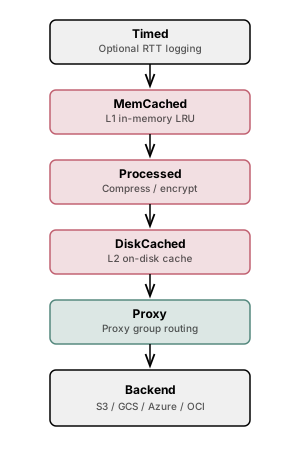
- Latency logging: Logs round-trip times for each operation when store RTT logging is enabled.
- In-memory cache: LRU-based in-memory block cache. Concurrent fetches for the same block are coalesced into a single request.3. Compression and encryption: Handles compression (LZ4, Snappy, zstd) and encryption (AES-256-GCM). On write: compress then encrypt. On read: decrypt then decompress.
- On-disk cache: Persistent on-disk block cache with LRU eviction. Supports writeback mode where writes are acknowledged immediately and flushed to the downstream store asynchronously.
- Proxy routing: Routes block operations through a proxy group selected by lowest RTT. Falls back to the underlying backend store on proxy errors.
- Cloud backend: The actual cloud storage implementation (S3, GCS, Azure, or OCI).
The on-disk cache is positioned between the compression/encryption layer and the proxy routing layer. This means that when compression or encryption is enabled, disk-cached blocks are stored in their processed (compressed and/or encrypted) form: they take less disk space and are never written to local disk in plaintext on an encrypted volume, but a disk cache hit still requires decryption and decompression.