

Authentication
FlexFS uses a multi-layer token model to authenticate and authorize access to different parts of the system. There are three types of tokens, each serving a distinct purpose.
Token types
Section titled “Token types”Account tokens
Section titled “Account tokens”Purpose: Authenticate administrative API access to the admin server.
Account tokens are associated with accounts and are used by:
configure.flexfsto manage resources (volumes, block stores, meta stores, etc.)- The CSI driver controller for dynamic volume provisioning
- Any client that needs to call the admin REST API
Account tokens are created when an account is created and can be viewed or rotated with configure.flexfs.
Volume tokens
Section titled “Volume tokens”Purpose: Authenticate mount clients to a specific volume.
Volume tokens are the primary authentication mechanism for mount.flexfs. Each volume token:
- Grants access to one specific volume
- Can optionally restrict the mount to a subdirectory via mount path scoping
- Can carry per-token mount flags (e.g.,
ro,noExec) - Is passed to the mount client via the credentials file
When a mount client connects to the metadata server, it presents the volume token. The metadata server validates the token with the admin server and returns the volume settings.
Metadata tokens
Section titled “Metadata tokens”Purpose: Authenticate metadata server connections to the admin server.
When a metadata server starts, it uses a token to authenticate with the admin server. This token is configured during meta.flexfs init creds and is stored in the metadata server’s credentials file.
Credential files
Section titled “Credential files”Each component stores its credentials in a TOML file created during init creds:
Mount client credentials
Section titled “Mount client credentials”adminAddr = "admin.example.com:443"token = "$TOKEN"For encrypted volumes, the secret is also stored:
adminAddr = "admin.example.com:443"token = "$TOKEN"secret = "$SECRET"The default credentials file location is determined during mount.flexfs init creds. You can override it with:
mount.flexfs start my-volume /mnt/data --credsFile /path/to/credsMetadata server credentials
Section titled “Metadata server credentials”The metadata server credentials file contains the admin server address and auth token, along with block store credentials:
adminAddr = "admin.example.com:443"token = "$TOKEN"configure.flexfs credentials
Section titled “configure.flexfs credentials”The configure.flexfs tool stores its credentials (admin server address and account token) in a separate credentials file, created during its init process.
Authentication flow
Section titled “Authentication flow”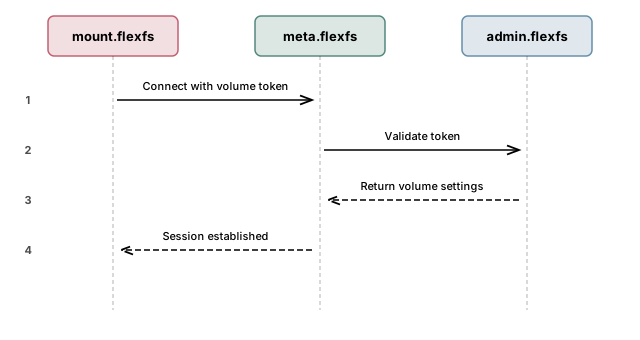
- The mount client reads the volume token from its credentials file.
- On connection, it sends the token to the metadata server.
- The metadata server validates the token with the admin server and retrieves volume settings.
- If valid, a session is established and the mount client can begin filesystem operations.
Token lifecycle
Section titled “Token lifecycle”| Action | Tool | Description |
|---|---|---|
| Create account token | configure.flexfs | Created when a new account is created |
| Create volume token | configure.flexfs | Created explicitly or auto-created when a volume is created |
| View tokens | configure.flexfs | List tokens for an account or volume |
| Revoke a token | configure.flexfs | Delete the token; existing mounts using it will disconnect |
Security best practices
Section titled “Security best practices”- Protect credentials files — set file permissions to
0600(owner read/write only). Theinit credscommand does this automatically. - Use separate volume tokens for different teams or applications so that access can be revoked independently.
- Use mount path scoping on volume tokens to restrict access to specific subdirectories. See Access Control for details.
- Rotate tokens periodically by creating new tokens and updating credentials files, then deleting old tokens.
Next steps
Section titled “Next steps”- TLS Certificates — secure the transport layer
- Access Control — POSIX permissions, root squashing, ACLs
- End-to-end Encryption — encrypt data at rest