

Enterprise: Configuration
After the Enterprise installer completes, the core infrastructure (one provider, one region, one block store, one meta store, one volume, and one volume token) is already in place. The configure.flexfs CLI lets you manage these resources and create additional ones.
Resource Model
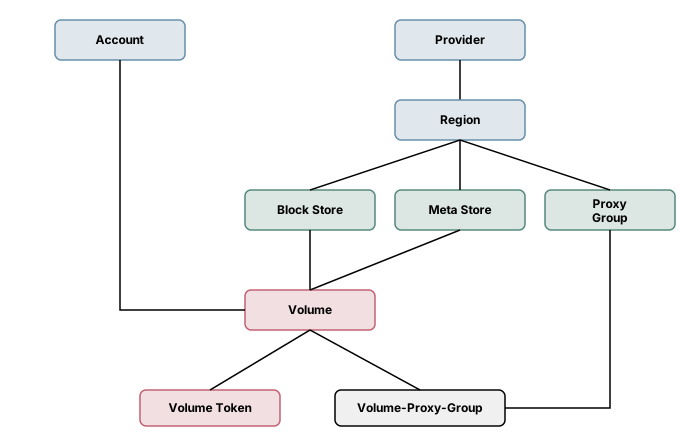
Section titled “Resource Model”FlexFS Enterprise organizes infrastructure into a hierarchy of resources. The installer creates the initial set during setup; configure.flexfs lets you add, modify, and remove them afterward.
Resource Types
Section titled “Resource Types”| Resource | CLI name | Description |
|---|---|---|
| Account | account | User account with an authentication token. Created automatically during install. |
| Provider | provider | Cloud provider (e.g. aws, gcp, azure, oci, or a custom name). |
| Region | region | Geographic region within a provider (e.g. us-east-1). Scoped to a provider. |
| Block Store | block-store | Object storage bucket configuration: provider, region, API, bucket, prefix, endpoint, and credentials. |
| Meta Store | meta-store | Metadata server registration: address and authentication token. |
| Volume | volume | A filesystem volume. Linked to one block store and one meta store. Defines block size, compression, encryption, retention, and quotas. |
| Volume Token | volume-token | Access token that mount clients use to authenticate. Scoped to a volume with optional mount-path restriction and per-token flags. |
| Proxy Group | proxy-group | A set of proxy server addresses in a provider/region. Mount clients select the lowest-latency group. |
| Volume-Proxy-Group | volume-proxy-group | Links a volume to a proxy group, enabling proxy caching for that volume. |
| Block API | block-api | Read-only reference table of supported storage APIs (s3, gcs, azure, oci). |
Using configure.flexfs
Section titled “Using configure.flexfs”configure.flexfs supports five operations on each resource type: list, show, create, update, and delete (where applicable).
Listing Resources
Section titled “Listing Resources”configure.flexfs list volumesconfigure.flexfs list block-storesconfigure.flexfs list volume-tokensconfigure.flexfs list proxy-groupsShowing a Resource
Section titled “Showing a Resource”Pass the resource primary key as a positional argument:
configure.flexfs show volume vol-01configure.flexfs show block-store 1configure.flexfs show meta-store 1Volumes can be referenced by name or UUID.
Creating Resources
Section titled “Creating Resources”Use --flag value syntax for each field. Required fields are enforced:
# Create a new providerconfigure.flexfs create provider --code custom --name "My Provider"
# Create a regionconfigure.flexfs create region --providerCode aws --code eu-west-1 --name eu-west-1
# Create a block storeconfigure.flexfs create block-store \  --providerCode aws \  --regionCode eu-west-1 \  --apiCode s3 \  --bucket my-eu-bucket \  --prefix flexfs
# Create a meta store (token is auto-generated if omitted)configure.flexfs create meta-store \  --providerCode aws \  --regionCode eu-west-1 \  --address 10.0.2.50:8443
# Create a volumeconfigure.flexfs create volume \  --name vol-02 \  --metaStoreID 2 \  --blockStoreID 2 \  --blockSize 4MiB \  --compression lz4
# Create a volume tokenconfigure.flexfs create volume-token --volumeID vol-02
# Create a volume token with mount-path scopingconfigure.flexfs create volume-token \  --volumeID vol-02 \  --mountPath /data/project-a \  --flags ro \  --notes "read-only access to project-a"
Updating Resources
Section titled “Updating Resources”Only mutable fields can be updated. Fields like block size, compression, and encryption are immutable after volume creation.
# Update volume quotasconfigure.flexfs update volume vol-01 \  --maxBlocks 5000000 \  --maxInodes 10000000
# Update volume retentionconfigure.flexfs update volume vol-01 --retention 30d
# Update block store credentialsconfigure.flexfs update block-store 1 \  --username $USERNAME \  --password $PASSWORD
# Update proxy group addressesconfigure.flexfs update proxy-group 1 \  --addresses 10.0.1.50:9443,10.0.1.51:9443
Deleting Resources
Section titled “Deleting Resources”# Delete a volume tokenconfigure.flexfs delete volume-token $TOKEN
# Retire a volume (marks it as retired; data is preserved per retention policy)configure.flexfs delete volume vol-02
# Delete a proxy groupconfigure.flexfs delete proxy-group 2
# Unlink a volume from a proxy groupconfigure.flexfs delete volume-proxy-group vol-01 1JSON Output
Section titled “JSON Output”Add --json to any command for machine-readable output:
configure.flexfs list volumes --jsonconfigure.flexfs show volume vol-01 --jsonconfigure.flexfs create volume-token --volumeID vol-01 --jsonVolume Configuration Details
Section titled “Volume Configuration Details”Immutable Settings (set at creation)
Section titled “Immutable Settings (set at creation)”| Field | Flag | Description |
|---|---|---|
| Block size | --blockSize | Size of each data block. Default: 4MiB. Valid range: 256KiB — 8MiB (must be a power of 2). |
| Compression | --compression | Algorithm: lz4, snappy, zstd, or none. Default: lz4. |
| Encryption | --encryption | Enable AES-256 end-to-end encryption. Default: false. |
Mutable Settings
Section titled “Mutable Settings”| Field | Flag | Description |
|---|---|---|
| Name | --name | Human-readable volume name. |
| Meta store | --metaStoreID | ID of the metadata store. |
| Block store | --blockStoreID | ID of the block store. |
| Max blocks | --maxBlocks | Block quota. 0 = unlimited. |
| Max inodes | --maxInodes | Inode quota. 0 = unlimited. |
| Max proxied | --maxProxied | Max proxied blocks per file. 0 = unlimited. |
| Flags | --flags | Comma-separated mount flags (e.g. ro,noatime,acl,xattr). |
| Retention | --retention | How long deleted metadata and block data are preserved. Accepts durations like 7d, 168h, 30d, or -1 for forever. Default: 7d. |
| Notes | --notes | Free-form text notes. |
Volume Token Fields
Section titled “Volume Token Fields”| Field | Flag | Description |
|---|---|---|
| Volume | --volumeID | Volume name or UUID (required). |
| Token | --token | UUID access token (auto-generated if omitted). |
| Mount path | --mountPath | Subdirectory path to expose as the filesystem root (e.g. /data/project). |
| Flags | --flags | Per-token mount flags that override volume-level defaults. |
| Notes | --notes | Free-form text notes. |
Linking Volumes to Proxy Groups
Section titled “Linking Volumes to Proxy Groups”To enable proxy caching for a volume, link it to one or more proxy groups:
# Link volume to a proxy groupconfigure.flexfs create volume-proxy-group \  --volumeID vol-01 \  --proxyGroupID 1
# List all volume-proxy-group associationsconfigure.flexfs list volume-proxy-groups
# Remove the associationconfigure.flexfs delete volume-proxy-group vol-01 1
A volume can be associated with multiple proxy groups. When a mount client starts, it probes all proxy groups configured for its volume, measures RTT to each, and selects the lowest-latency group. If no proxy group is reachable, the client falls back to direct object storage access.
Credentials
Section titled “Credentials”configure.flexfs stores its connection settings in ~root/.flexfs/configure/creds. The installer initializes this file automatically. If you need to re-initialize:
configure.flexfs init creds --force \ --adminAddr 10.0.1.50:443 \ --token $TOKENNext Steps
Section titled “Next Steps”- Enterprise: First Mount — install the mount client on a remote host and mount the filesystem