

Docker Compose
This guide shows how to use Docker Compose to run a flexFS mount as a sidecar container alongside your application containers. The sidecar pattern keeps the FUSE mount in a dedicated container that shares its filesystem with the application containers via a shared volume.
Architecture
Section titled “Architecture”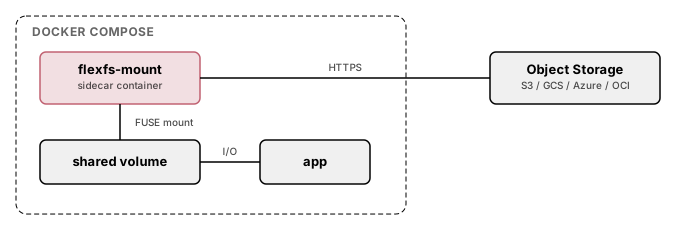
docker-compose.yml
Section titled “docker-compose.yml”services: flexfs-mount: image: ubuntu:24.04 cap_add: - SYS_ADMIN devices: - /dev/fuse volumes: - flexfs-data:/mnt/data:rshared - ./creds:/etc/flexfs/creds:ro - ./mount.flexfs:/sbin/mount.flexfs:ro environment: - FLEXFS_VOLUME=my-volume command: > /sbin/mount.flexfs start $${FLEXFS_VOLUME} /mnt/data --foreground --credsFile /etc/flexfs/creds restart: unless-stopped healthcheck: test: ["CMD", "mountpoint", "-q", "/mnt/data"] interval: 10s timeout: 5s retries: 3
application: image: your-application:latest volumes: - flexfs-data:/data:rshared depends_on: flexfs-mount: condition: service_healthy
volumes: flexfs-data: driver: local driver_opts: type: none o: bind device: /tmp/flexfs-sharedStep-by-step setup
Section titled “Step-by-step setup”1. Prepare the mount binary
Section titled “1. Prepare the mount binary”Copy mount.flexfs to the project directory, or mount it from a known path on the host:
cp /usr/sbin/mount.flexfs ./mount.flexfs2. Create the credentials file
Section titled “2. Create the credentials file”cat > creds <<EOFadminAddr = "$ADMIN_ADDR"token = "$TOKEN"EOFchmod 600 creds3. Create the shared directory
Section titled “3. Create the shared directory”mkdir -p /tmp/flexfs-shared4. Start the services
Section titled “4. Start the services”docker compose up -d5. Verify
Section titled “5. Verify”# Check mount sidecar healthdocker compose ps
# Verify mount inside the application containerdocker compose exec application ls /dataUsing a dedicated flexFS image
Section titled “Using a dedicated flexFS image”Instead of mounting the binary from the host, you can build a dedicated image:
FROM ubuntu:24.04RUN apt-get update && apt-get install -y fuse3 ca-certificates && rm -rf /var/lib/apt/lists/*COPY mount.flexfs /sbin/mount.flexfsRUN chmod +x /sbin/mount.flexfsENTRYPOINT ["/sbin/mount.flexfs"]Then reference it in docker-compose.yml:
services: flexfs-mount: build: ./flexfs-image cap_add: - SYS_ADMIN devices: - /dev/fuse volumes: - flexfs-data:/mnt/data:rshared - ./creds:/etc/flexfs/creds:ro command: > start my-volume /mnt/data --foreground --credsFile /etc/flexfs/credsMultiple volumes
Section titled “Multiple volumes”To mount multiple flexFS volumes, add additional sidecar services:
services:  flexfs-input:    image: flexfs-mount:latest    cap_add:      - SYS_ADMIN    devices:      - /dev/fuse    volumes:      - input-data:/mnt/data:rshared      - ./creds-input:/etc/flexfs/creds:ro    command: start input-volume /mnt/data --foreground --credsFile /etc/flexfs/creds
  flexfs-output:    image: flexfs-mount:latest    cap_add:      - SYS_ADMIN    devices:      - /dev/fuse    volumes:      - output-data:/mnt/data:rshared      - ./creds-output:/etc/flexfs/creds:ro    command: start output-volume /mnt/data --foreground --credsFile /etc/flexfs/creds
  application:    image: your-application:latest    volumes:      - input-data:/input:rshared      - output-data:/output:rshared    depends_on:      flexfs-input:        condition: service_healthy      flexfs-output:        condition: service_healthy
Read-only mounts
Section titled “Read-only mounts”To mount a volume as read-only, add --ro to the mount command:
command: start my-volume /mnt/data --foreground --credsFile /etc/flexfs/creds --roGraceful shutdown
Section titled “Graceful shutdown”When docker compose down is issued, the mount.flexfs process receives SIGTERM and cleanly unmounts the FUSE filesystem before the container exits.