Component Roles
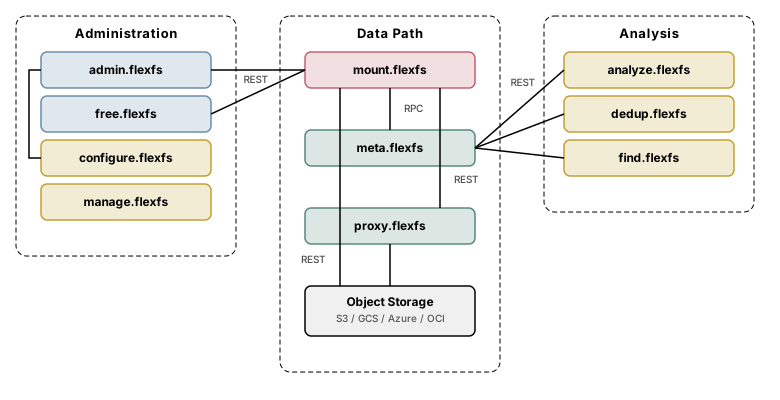
FlexFS is composed of 14 binaries organized into servers, clients/drivers, and utilities. This page describes the purpose and role of each.
Servers
Section titled “Servers”Servers are long-running processes typically managed by systemd. They bind to network ports and serve requests from clients and other servers.
admin.flexfs (Enterprise)
Section titled “admin.flexfs (Enterprise)”The Enterprise administration server. It stores and serves the cluster configuration — providers, regions, block stores, metadata stores, volumes, volume tokens, proxy groups, and accounts. All configuration changes go through its REST API, which is accessed interactively via configure.flexfs or programmatically.
admin.flexfs also hosts deploy endpoints that mount clients use for auto-update: it serves the latest mount.flexfs binary so clients can upgrade themselves without manual intervention.
free.flexfs (Community)
Section titled “free.flexfs (Community)”The Community edition administration server. It provides the same deploy endpoints and volume settings API as admin.flexfs, but manages a single pre-configured volume. There is no interactive configuration tool and no support for end-to-end encryption, proxy groups, or dynamic Kubernetes provisioning.
All CLI utilities (analyze.flexfs, dedup.flexfs, find.flexfs, manage.flexfs, update.flexfs) work with the Community edition. Local on-disk writeback caching is also available.
meta.flexfs
Section titled “meta.flexfs”The metadata server. It stores and serves all filesystem metadata: inodes, directory entries, file attributes, extended attributes (xattrs), ACLs, and file locks. Mount clients communicate with it over a binary RPC protocol for all metadata operations.
The metadata server also performs block reconciliation — periodically scanning object storage to clean up orphaned blocks that are no longer referenced by any inode (for example, after file deletions or overwrites, once the volume’s retention period has elapsed).
Each metadata server instance is associated with one or more volumes. In Enterprise deployments, multiple metadata server instances can run on different hosts, each serving a different set of volumes.
proxy.flexfs (Enterprise)
Section titled “proxy.flexfs (Enterprise)”The proxy server provides a CDN-like block caching layer between mount clients and object storage. Proxy servers are organized into proxy groups — sets of one or more proxy addresses that serve the same logical caching tier.
When a mount client starts, it probes all proxy groups configured for its volume, measures the round-trip time to each, and selects the lowest-latency group. Within a group, blocks are distributed across proxy servers using rendezvous hashing (also known as highest random weight hashing), ensuring consistent key-to-server mapping even as group membership changes.
Proxy servers maintain a local disk cache. In writeback mode, writes are acknowledged to the mount client as soon as the proxy has persisted the block locally, and the proxy asynchronously flushes blocks to object storage in the background. This makes proxy groups especially effective for hybrid cloud and on-premises deployments where object storage latency would otherwise be a bottleneck.
If no proxy group is reachable, mount clients automatically fall back to direct object storage access.
stat.flexfs (Enterprise)
Section titled “stat.flexfs (Enterprise)”The statistics server is an internal billing and metering component. It collects usage data from metadata servers and generates reports for capacity planning and licensing. In most deployments, it is operated by Paradigm4.
Clients and drivers
Section titled “Clients and drivers”mount.flexfs
Section titled “mount.flexfs”The mount client. It uses Linux FUSE (Filesystem in Userspace) to present a POSIX-compatible filesystem to applications. When an application issues a system call (open, read, write, stat, etc.), the kernel routes it through /dev/fuse to mount.flexfs, which translates it into metadata RPCs and block storage operations.
Key responsibilities:
- Metadata RPC: All metadata operations (lookup, create, setattr, readdir, lock, xattr, ACL) are sent to the metadata server over a persistent RPC connection.
- Block I/O: File data is read from and written to object storage (or proxy servers) over HTTPS REST. Blocks are compressed, optionally encrypted, and cached locally.
- Three-tier caching: In-memory LRU cache, optional on-disk cache with writeback support, and optional proxy group routing.
- Auto-update: Polls the administration server’s deploy endpoint for new versions and performs a seamless FUSE session handoff to the updated binary.
- Time-travel: Supports read-only mounting at a specific point in time (
--atTimein RFC 3339 format).
mount.flexfs runs as a daemon by default, forking into the background and logging to a file. It can also run in foreground mode or under systemd.
csi.flexfs
Section titled “csi.flexfs”The Kubernetes CSI (Container Storage Interface) driver. It wraps mount.flexfs to provide native Kubernetes volume provisioning. It consists of a controller component (Deployment) and a node component (DaemonSet). The Enterprise edition supports dynamic provisioning via StorageClass; both editions support static provisioning via PersistentVolume.
Utilities
Section titled “Utilities”Utilities are short-lived command-line tools that perform administrative or analytical tasks.
configure.flexfs (Enterprise)
Section titled “configure.flexfs (Enterprise)”The interactive configuration tool for Enterprise deployments. It provides a REPL (read-eval-print loop) and single-command mode for managing all ten resource types: providers, regions, block APIs, block stores, metadata stores, volumes, volume tokens, accounts, proxy groups, and volume-proxy-group associations.
Not available in the Community edition.
manage.flexfs
Section titled “manage.flexfs”The host management tool. It provides subcommands for controlling flexFS services on a host: start, stop, restart, status, clean, download, install, deploy, upgrade, and watch. It manages service ordering and requires root privileges.
analyze.flexfs
Section titled “analyze.flexfs”Volume analysis tool. Connects to a metadata server and generates reports on files, folders, and per-user usage. Useful for capacity planning and auditing.
dedup.flexfs
Section titled “dedup.flexfs”File deduplication tool. Scans a mounted volume for duplicate files (by size filtering and content comparison), and optionally hard-links duplicates to reclaim storage.
find.flexfs
Section titled “find.flexfs”Filesystem search tool. Queries the metadata server to locate files and directories matching specified criteria, similar to the Unix find command but operating directly against the metadata store rather than traversing the FUSE mount.
update.flexfs
Section titled “update.flexfs”Manual update tool. Downloads and installs a new version of the flexFS binaries from the administration server’s deploy endpoint. Used when auto-update is disabled or for initial upgrades.
license.flexfs
Section titled “license.flexfs”Internal licensing tool for generating and validating flexFS license keys.
Component relationships
Section titled “Component relationships”