

Caching Architecture
FlexFS employs a three-tier caching architecture to minimize latency and reduce the number of requests to object storage. Each tier serves a different access pattern and can be independently configured.
Cache tiers at a glance
Section titled “Cache tiers at a glance”

| Tier | Location | Eviction | Writeback | Edition |
|---|---|---|---|---|
| L1 | mount client memory | LRU | No (read cache) | Both |
| L2 | mount client disk | LRU (clean blocks) | Optional | Both |
| L3 | proxy server disk | LRU (clean blocks) | Optional | Enterprise |
L1: In-memory LRU cache
Section titled “L1: In-memory LRU cache”The L1 cache is an in-memory LRU (Least Recently Used) cache that sits at the top of the store pipeline, closest to the application. It caches processed (decompressed, decrypted) blocks, so cache hits avoid all processing overhead.
Key characteristics
Section titled “Key characteristics”- Capacity: Configurable via
--memCapacity(in blocks). When set to 0 (the default), it is auto-sized to approximately 2.5% of total system RAM divided by the volume’s block size, with a minimum of 16 blocks. - Eviction: LRU. When the cache is full, the least recently used block is evicted and its buffer is returned to the pool.
- Coalesced fetches: Concurrent requests for the same block are coalesced into a single downstream fetch using a singleflight mechanism. This prevents cache stampedes when many threads read the same file region simultaneously.
- Prefetch integration: Prefetched blocks are inserted into the L1 cache. If a block is already cached, the prefetch is skipped.
- Write-through: When a block is written (PutBlock), it is added to the L1 cache and simultaneously passed downstream.
Auto-sizing example
Section titled “Auto-sizing example”On a host with 32 GiB of RAM and a 4 MiB block size:
0.025 * 32 GiB / 4 MiB = 204 blocks(approximately 816 MiB of cached data)
L2: On-disk cache
Section titled “L2: On-disk cache”The L2 cache persists blocks to local disk, surviving process restarts and providing much larger capacity than memory. It caches blocks in their processed form (after compression and encryption), meaning cache hits still avoid network I/O but do require decompression and decryption.
Configuration flags
Section titled “Configuration flags”| Flag | Default | Description |
|---|---|---|
--diskFolder | /dev/shm/.flexfs-cache-<pid> | Directory for cached block files |
--diskQuota | (empty — disabled) | Maximum disk usage for the cache (e.g., 5%, 64M, 10G) |
--diskMaxBlockSize | 131072 (128 KiB) | Maximum processed block size to cache on disk. Blocks larger than this after compression/encryption bypass the disk cache. Set to 0 for no limit. |
--diskWriteback | false | Enable writeback mode (see below) |
LRU eviction
Section titled “LRU eviction”The disk cache maintains an LRU list for clean blocks (blocks that have been persisted to object storage). When the cache needs space for new blocks:
- The oldest clean block is evicted from the LRU list.
- Its disk file is deleted.
- If no clean blocks remain (the cache is full of dirty blocks in writeback mode), the new block bypasses the cache entirely.
Writeback mode
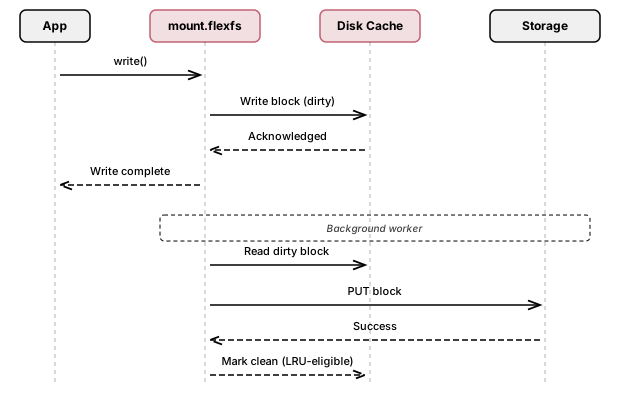
Section titled “Writeback mode”When --diskWriteback is enabled, the disk cache operates as a writeback cache for writes:
- The mount client writes the processed block to the disk cache.
- The write is acknowledged to the application immediately (low latency).
- A pool of background worker goroutines reads dirty blocks from disk and persists them to object storage asynchronously.
- After a dirty block is successfully persisted, it transitions to a clean state and becomes eligible for LRU eviction.
Writeback mode is especially useful for:
- Latency-sensitive workloads: Write latency is bounded by local disk speed rather than object storage round-trip time.
- Bursty write patterns: The disk cache absorbs write bursts while background workers drain to storage at a sustainable rate.
- On-premises deployments: When object storage is in a remote cloud region, writeback caching masks the network latency.
The number of writeback worker goroutines equals the maxBops setting (auto-sized based on CPU count if not set). Workers retry indefinitely on transient errors, with randomized backoff capped at 10 seconds.
L3: Proxy group cache (Enterprise)
Section titled “L3: Proxy group cache (Enterprise)”Proxy groups provide a shared caching layer between mount clients and object storage. They function like a content delivery network (CDN) for block data.
How proxy groups work
Section titled “How proxy groups work”-
Group selection: When a mount client starts, it probes all proxy groups configured for its volume by sending a health-check request to the first address in each group. It selects the group with the lowest round-trip time (RTT), using a 125 ms timeout for the probe.
-
Block routing: Within the selected group, blocks are distributed across proxy servers using rendezvous hashing (highest random weight hashing) with xxHash. This ensures that:
- The same block always routes to the same proxy server (cache consistency).
- Adding or removing a proxy server only redistributes a fraction of blocks (minimal cache disruption).
-
Proxy-side caching: Each proxy server maintains its own disk cache. On a GET, if the block is cached locally, it is returned immediately. On a cache miss, the proxy fetches the block from object storage, caches it, and returns it to the client.
-
Proxy-side writeback: Proxy servers can operate in writeback mode, where PUT requests are acknowledged as soon as the block is persisted to the proxy’s local disk. The proxy then asynchronously flushes the block to object storage.
-
Graceful fallback: If the selected proxy group becomes unreachable (e.g., network failure), mount clients automatically bypass the proxy and communicate directly with object storage for 5 minutes before retrying the proxy.
Proxy group configuration
Section titled “Proxy group configuration”Proxy groups are created and associated with volumes via configure.flexfs:
- proxy-group: Defines a group with a provider, region, and comma-separated list of proxy server addresses.
- volume-proxy-group: Associates a proxy group with a volume. A volume can have multiple proxy groups; the mount client selects the best one based on RTT.
Max proxied blocks
Section titled “Max proxied blocks”Volumes have a maxProxied setting that limits how many blocks per file (by block index) are routed through proxies. Blocks beyond this index bypass the proxy and go directly to object storage. This is useful for large files where only the first portion benefits from proxy caching. When set to 0, all blocks are eligible for proxying.
Dirty block cache
Section titled “Dirty block cache”In addition to the three read-cache tiers, mount.flexfs maintains an in-memory dirty block cache for write operations. This cache holds modified blocks that have not yet been synced to storage.
| Setting | Default | Description |
|---|---|---|
--dirtyCapacity | Auto-sized (0.5% RAM / block size, capped) | Maximum number of dirty blocks in memory |
--dirtyActive | Auto-sized (half of dirtyCapacity) | Maximum number of dirty blocks actively syncing |
Dirty blocks are flushed when:
- The application calls
fsync(),fdatasync(), orclose() - The dirty cache reaches capacity (back-pressure flush)
- The FUSE
Flushoperation is triggered
Prefetching
Section titled “Prefetching”Mount.flexfs includes a block prefetcher that proactively loads blocks into the L1 cache before they are requested.
| Setting | Default | Description |
|---|---|---|
--prefetchActive | Auto-sized (maxBops/2, capped at memCapacity/4) | Maximum number of concurrent prefetch operations |
--noPrefetch | false | Disable prefetching entirely |
Prefetched blocks share the singleflight mechanism with regular reads, so a prefetch and a concurrent read for the same block result in a single downstream fetch.
Buffer pool
Section titled “Buffer pool”All block buffers are managed by a reusable buffer pool to minimize memory allocation overhead and garbage collection pressure. The pool capacity is auto-sized based on the combined active prefetch and dirty-sync concurrency.
| Setting | Default | Description |
|---|---|---|
--poolCapacity | Auto-sized (prefetchActive + dirtyActive) | Number of reusable block buffers in the pool |
FUSE kernel caching
Section titled “FUSE kernel caching”In addition to the userspace caches described above, mount.flexfs configures the Linux FUSE kernel module’s caching behavior:
| Setting | Default | Description |
|---|---|---|
--attrValid | 3600 (1 hour) | Seconds the kernel caches file attributes |
--entryValid | 1 | Seconds the kernel caches directory entries |
These kernel-level caches reduce the number of FUSE round trips for repeated stat() and directory lookups. They are separate from and additive to the block caching tiers.
FlexFS also uses event-driven inode invalidation: when another mount client modifies a file or directory, the metadata server pushes a notification to all other connected clients, which immediately invalidate the affected kernel cache entries. The TTL values above are therefore a fallback for inodes that have not been explicitly invalidated by a remote update.